

What This System Does
The Chain of Thought Analysis System mimics human-like reasoning by:
- Analyzing query complexity before planning
- Generating multiple candidate plans for solving problems
- Evaluating and selecting the best plan
- Executing tasks sequentially with immediate quality evaluation
- Iterating when results don't meet quality thresholds
- Synthesizing findings into coherent final answers
Design Philosophy
Helping Smaller Models Punch Above Their Weight
This system is designed to help smaller language models deliver analysis far more sophisticated than what one might expect from their size alone. By breaking down complex problems into manageable pieces, structuring the reasoning process, and enforcing quality checks at each step, the system enables models like GPT-OSS 20B to perform analysis that would normally require much larger models.
Controlled Reasoning
Models like GPT-OSS 20B and 120B include their own internal reasoning capabilities. This program disables that internal reasoning as much as possible because it provides its own structured reasoning framework. The goal is to shift the reasoning process onto the program's architecture, where it can be controlled, monitored, and quality-checked at each step.
Three Core Components
| Component | Description |
|---|---|
| The Program | Python application that orchestrates planning, execution, quality control, and output generation |
| Large Language Models | GPT-OSS 20B or 120B perform the actual reasoning, planning, and analysis work |
| Inference Platform | Provides high-speed hosted inference for the models |
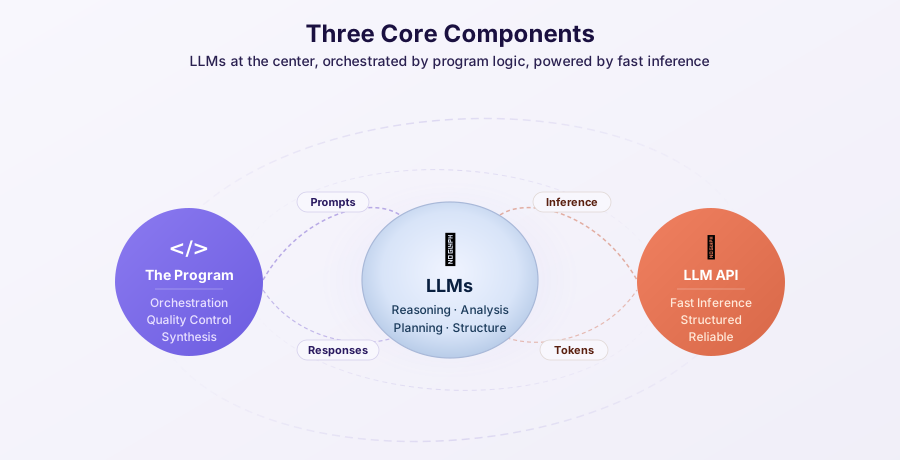
Three Core Components Architecture
How It Works
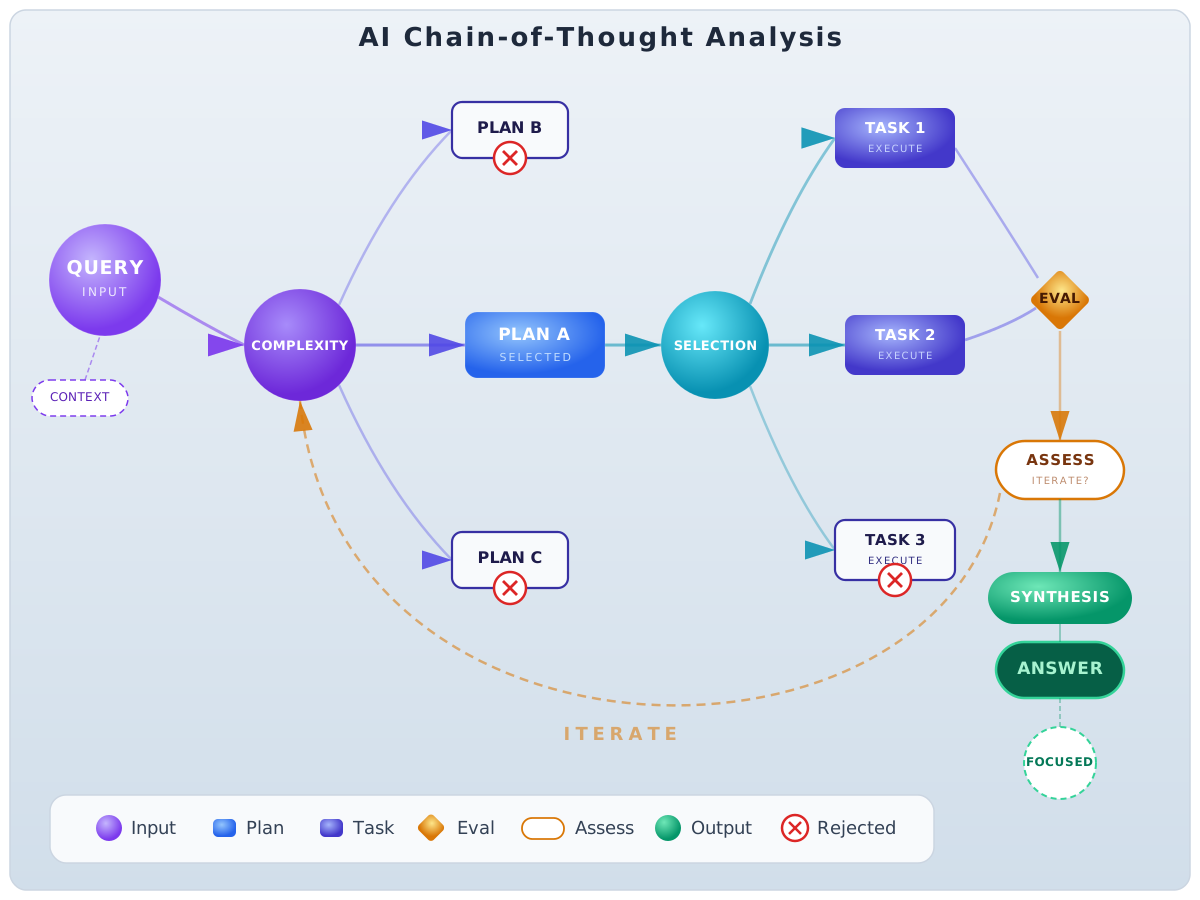
Pipeline Flow Overview
Each task is evaluated immediately after completion. Only accepted tasks write their results to analysis history, ensuring subsequent tasks see only quality results.
Input Limits
| Input | Limit | Description |
|---|---|---|
| Query | 1,200 characters | The question or task you want analyzed |
| Context | 36,000 characters | Background information, data, or documents |
These are character limits, not token limits.
Best Practice for Context
Rather than feeding in massive documents and hoping the LLM finds what's relevant, pre-process and focus your context:
- Extract relevant sections that directly relate to your query
- Summarize background information to its essential points
- Remove redundant or tangential content
- Use another tool (or this program itself) to distill large documents first
Quick Start
Simple One-Shot Analysis
import asyncio
from agent import run_analysis

async def main():
    result = await run_analysis(
        query="What are the key factors affecting renewable energy adoption?",
        context="Focus on economic and policy factors in the United States.",
    api_key="your-access-key",
        params={
            "mode": "balanced",
            "max_iterations": 3,
        }
    )

    print(f"Final Answer: {result.final_answer}")
    print(f"Execution Time: {result.execution_time:.2f}s")
    print(f"Success: {result.success}")

asyncio.run(main())
With More Control
import asyncio
from agent import create_agent

async def main():
    agent = await create_agent(
        agent_id="myagnt",
    api_key="your-access-key",
        params={
            "model": "openai/gpt-oss-120b",
            "mode": "thorough",
            "cost_limit": 0.50,
        }
    )

    try:
        result = await agent.analyze(
            query="Analyze the potential impact of quantum computing on cryptography.",
            context="Consider both near-term and long-term implications."
        )

        print(f"Success: {result.success}")
        print(f"Final Answer: {result.final_answer}")

    finally:
        await agent.cleanup()

asyncio.run(main())
Example Output
After running an analysis, you receive a
MainAnalysisOutput object:
result = await run_analysis(
        query="What factors affect solar panel efficiency?",
        api_key=key,
        params={"focused_answer_type": "number"}
      )

# Access different answer layers
full_synthesis = result.synthesis_display.answer      # Comprehensive analysis
final_answer = result.final_answer_display.answer     # Refined, user-ready response
focused_value = result.focused_answer_display.answer_value  # Constrained answer

# Metadata
print(f"Title: {result.title}")
print(f"Execution time: {result.execution_time:.2f}s")
print(f"Tasks executed: {result.task_count}")
print(f"Iterations: {result.total_iterations}")

# Cost tracking
print(f"Total cost: ${result.cost_snapshot['costs']['total_cost']:.4f}")
Available Models
| Model | Best For | Cost (per M tokens) |
|---|---|---|
| GPT-OSS 20B | Cost-efficient analysis, faster execution, simpler queries | $0.075 input / $0.30 output |
| GPT-OSS 120B | Complex reasoning, research tasks, accuracy-critical work | $0.15 input / $0.60 output |
Both models have 128K token context windows and are available under Apache 2.0 license.
Execution Modes
| Mode | Iterations | Best For |
|---|---|---|
quick |
1-2 | Simple questions, fast responses |
balanced |
2-3 | Most general analysis tasks |
thorough |
3-4 | Complex problems, important decisions |
research |
4-5 | Deep research, comprehensive analysis |
Requirements
- Primary Access Credential (required) — Grants model access
- Live Research Credential (optional) — Enables live external research when available
- Image Generation Credential (optional) — Enables optional report artwork
Documentation Pages
| Page | Description |
|---|---|
| Quickstart | Entry points, first analysis walkthrough |
| Settings | Hosted web controls plus advanced integration settings |
| Pipeline | The 6 pipeline stages and Stage 2 plan-selection sub-step |
| Tools | Reasoning, Knowledge, and Python tools |
| Outputs | Understanding analysis results |
| Concurrent | Async usage and ensemble analysis |
| Reference | Access, model tiers, safeguards, and troubleshooting |