

result = await run_analysis(
    query="Your query here",
            api_key=key,
    params={
        "mode": "balanced",
        "model": "openai/gpt-oss-120b",
        "max_iterations": 3,
        # ... other settings
    }
)
Surface Compatibility
The codebase exposes two related but different settings surfaces: advanced programmatic integrations and the narrower hosted web interface.
The core Python API exposes 18 params fields. The
hosted web experience exposes 15 request fields: 14 shared analysis
settings plus generate_image.
| Surface | What It Exposes | Notes |
|---|---|---|
| Shared settings |
model, mode,
cost_limit, temperature_offset,
enable_complexity_analysis,
enforce_iterations,
min_iterations, max_iterations,
candidate_plans,
focused_answer_type,
enable_content_filter,
execution_retry_limit,
use_concurrent_execution
|
Available in both advanced integrations and the hosted web experience. |
| Hosted web only | generate_image |
Controls whether the hosted experience requests optional report artwork. |
| Advanced integrations only |
global_run_attempts, save_mode,
reasoning_effort,
thinking_budget
|
Useful for direct programmatic integrations; not exposed in the hosted web form. |
Model Selection
model
Which LLM model to use for analysis.
| Type | String |
|---|---|
| Allowed Values |
"openai/gpt-oss-20b",
"openai/gpt-oss-120b"
|
| Default | "openai/gpt-oss-20b" |
When to change:
| Choose | When |
|---|---|
gpt-oss-20b |
Cost-efficient analysis, faster execution, simpler queries |
gpt-oss-120b |
Complex reasoning, research tasks, when accuracy is paramount |
Execution Mode
mode
Pre-configured execution profile that adjusts multiple settings at once.
| Type | String |
|---|---|
| Allowed Values |
"quick", "balanced",
"thorough", "research"
|
| Default | "quick" |
Mode comparison:
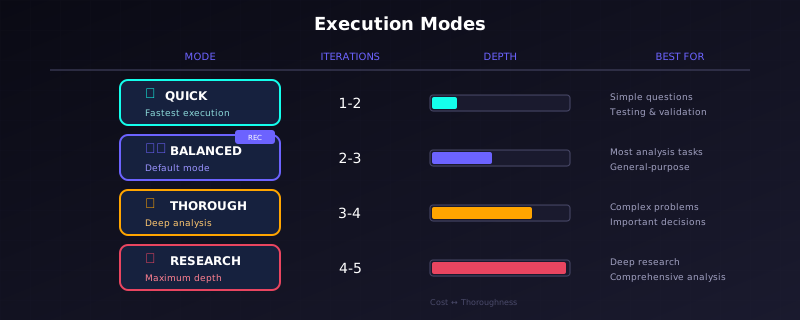
Visual Comparison of Execution Modes
| Mode | Iterations | Timeout | Best For |
|---|---|---|---|
quick |
1-2 | Short | Simple questions, fast responses |
balanced |
2-3 | Medium | Most general analysis tasks |
thorough |
3-4 | Long | Complex problems, important decisions |
research |
4-5 | Extended | Deep research, comprehensive analysis |
When to change:
-
Use
quickfor straightforward factual questions or when testing -
Use
balancedfor typical analysis work (good default) -
Use
thoroughwhen the answer matters and you need confidence -
Use
researchfor multi-faceted problems requiring deep exploration
Iteration Control
max_iterations
Maximum number of analysis iterations before forcing synthesis.
| Type | Integer |
|---|---|
| Allowed Values |
1, 2, 3,
4, 5
|
| Default | 2 |
When to change: Increase for complex problems requiring deep exploration. Decrease for simple queries to save cost.
Effect: More iterations = more thorough analysis but higher cost.
min_iterations
Minimum iterations before allowing early termination.
| Type | Integer |
|---|---|
| Allowed Values | 1, 2, 3 |
| Default | 1 |
When to change: Increase when you want to ensure the system explores multiple approaches before concluding, even if early results look good.
enforce_iterations
Whether to enforce minimum iterations before allowing termination.
| Type | Boolean |
|---|---|
| Allowed Values | True, False |
| Default | False |
When to change: Set to True when you
want guaranteed multi-pass analysis regardless of intermediate
quality scores.
Planning Configuration
candidate_plans
Number of candidate plans to generate before selecting the best one.
| Type | Integer |
|---|---|
| Allowed Values |
1, 2, 3,
4, 5
|
| Default | 3 |
When to change:
| Value | Situation |
|---|---|
1 |
Simple queries where strategy diversity doesn't help; saves cost |
3 |
Default; good balance of options vs. cost |
5 |
Complex problems where the right approach isn't obvious |
enable_complexity_analysis
Whether to analyze query complexity before planning.
| Type | Boolean |
|---|---|
| Allowed Values | True, False |
| Default | True |
Effect: Complexity analysis helps tune task count and strategy appropriately for your query.
When to change: Disable for simple queries to save one LLM call (minor cost savings).
Temperature & Creativity
temperature_offset
Adjustment to base temperatures across all operations.
| Type | Float |
|---|---|
| Allowed Values | -0.5 to 0.5 |
| Default | 0.0 |
When to change:
| Offset | Effect | Use For |
|---|---|---|
Negative (e.g., -0.3) |
More focused, consistent, deterministic | Factual queries, reproducible results |
Zero (0.0) |
Balanced (default) | Most tasks |
Positive (e.g., +0.3) |
More creative, varied, exploratory | Brainstorming, diverse perspectives |
Cost Control
cost_limit
Maximum cost allowed for the entire analysis (in USD).
| Type | Float |
|---|---|
| Allowed Values | 0.01 to 1.00 |
| Default | Varies by mode |
When to change: Adjust based on your budget and the importance of the analysis.
Retry Configuration
global_run_attempts
Python API only. Number of complete analysis restart attempts on failure.
| Type | Integer |
|---|---|
| Allowed Values | 1, 2, 3 |
| Default | 1 |
When to change: Increase for critical analyses where you want automatic recovery from failures. Each restart is a complete re-run, so costs can multiply.
Hosted web note: The public form does not expose this field.
execution_retry_limit
Maximum retries when tasks fail or are rejected within an iteration.
| Type | Integer |
|---|---|
| Allowed Values | 0 to 10 |
| Default | 3 |
When to change: Increase for difficult computational tasks that may need multiple attempts. Decrease if you want faster failure.
Output Configuration
generate_image
Hosted web interface only. Request an AI-generated image for the analysis output.
| Type | Boolean |
|---|---|
| Allowed Values | True, False |
| Default | False |
Effect: When enabled, the hosted experience asks for optional report artwork. If image generation is unavailable in the current environment, the analysis still completes without an image.
save_mode
Python API only. Where to save analysis outputs.
| Type | String |
|---|---|
| Allowed Values |
"local", "cloud",
"none"
|
| Default | "none" |
Options:
| Mode | Description | Output Location |
|---|---|---|
none |
No files saved | Data returned in memory only |
local |
Save to disk | Local output directory |
cloud |
Save to hosted storage | Hosted report folder |
Hosted web note: The hosted experience handles
report storage automatically and does not accept
save_mode in the public request payload.
focused_answer_type
Request a specific answer format in addition to the full synthesis.
| Type | String |
|---|---|
| Allowed Values | See table below |
| Default | "none" |
Available types:
| Type | Output Options |
|---|---|
none |
No focused answer (default) |
number |
Numeric value |
yes/no |
"Yes" or "No" |
true/false |
"True" or "False" |
good/bad |
"Good" or "Bad" |
high/low |
"High" or "Low" |
accepted/rejected |
"Accepted" or "Rejected" |
yes/maybe/no |
"Yes", "Maybe", or "No" |
good/neutral/bad |
"Good", "Neutral", or "Bad" |
high/medium/low |
"High", "Medium", or "Low" |
When to change: When you need a definitive categorical or numeric answer, especially for:
- Automated pipelines that need predictable output formats
- Decision support systems
- Middleware integration
Content Safety
enable_content_filter
Whether to validate user inputs against content policy.
| Type | Boolean |
|---|---|
| Allowed Values | True, False |
| Default | True |
Effect: When enabled, queries with inappropriate content are rejected before analysis begins.
Execution Mode
use_concurrent_execution
Whether to execute certain operations concurrently.
| Type | Boolean |
|---|---|
| Allowed Values | True, False |
| Default | False |
When to change:
| Value | Situation |
|---|---|
False |
Single-GPU environments; maximizes prompt caching (default) |
True |
Multiple GPUs or high-throughput API access; faster but less cache-efficient |
Advanced Settings (Python API Only)
reasoning_effort
Python API only. Accepted by validation but currently rejected by the available model support.
| Type | String |
|---|---|
| Allowed Values |
"minimal", "low",
"medium", "high"
|
| Default | "low" |
Current behavior: Supplying this parameter raises an error because none of the currently available public models use it.
thinking_budget
Python API only. Token budget placeholder for extended thinking.
| Type | Integer |
|---|---|
| Allowed Values |
0, -1, 1024,
2048, 4096, 8192,
16384, 24576
|
| Default | 0 (disabled) |
Quick Reference
| Setting | Default | Common Adjustments |
|---|---|---|
model |
gpt-oss-20b |
Upgrade to 120b for complex tasks |
mode |
quick |
Use balanced or thorough for
important work
|
max_iterations |
2 |
Increase to 3-4 for deep analysis |
candidate_plans |
3 |
Reduce to 1 for simple queries |
temperature_offset |
0.0 |
Negative for consistency, positive for creativity |
cost_limit |
varies | Set higher than expected to avoid cutoff |
generate_image |
false |
Hosted web only; enable when you want a generated image |
save_mode |
none |
Python API only; use local to generate HTML
reports
|
focused_answer_type |
none |
Set when you need constrained outputs |
Example Configurations
Budget-Conscious Quick Analysis
params = {
    "model": "openai/gpt-oss-20b",
    "mode": "quick",
    "candidate_plans": 1,
    "max_iterations": 1,
    "cost_limit": 0.05,
}
Thorough Research Analysis
params = {
    "model": "openai/gpt-oss-120b",
    "mode": "research",
    "candidate_plans": 5,
    "max_iterations": 5,
    "min_iterations": 2,
    "enforce_iterations": True,
    "cost_limit": 0.75,
    "save_mode": "local",  # Python API only
}
Automated Decision Pipeline
params = {
    "model": "openai/gpt-oss-120b",
    "mode": "thorough",
    "focused_answer_type": "yes/no",
    "temperature_offset": -0.2,  # More deterministic
    "global_run_attempts": 2,    # Python API only; retry on failure
}
Hosted Web Request With Image Generation
{
  "password": "YOUR_PASSWORD",
  "agent_id": "samplea",
  "query": "Explain the process of photosynthesis in plants.",
  "model": "openai/gpt-oss-20b",
  "mode": "balanced",
  "generate_image": true,
  "cost_limit": 0.15
}
Ensemble Voting (Multiple Runs)
# Run with varying temperatures
for i in range(5):
    params = {
        "mode": "balanced",
        "temperature_offset": 0.1 * i,  # 0.0, 0.1, 0.2, 0.3, 0.4
        "focused_answer_type": "yes/no",
    }
    results.append(await run_analysis(query, api_key=key, params=params))