

Tool Overview
| Tool | Internal Name | Purpose |
|---|---|---|
| Reasoning | logic_kernel |
Complex logical analysis and multi-step reasoning |
| Knowledge | knowledge_retriever |
Knowledge extraction from the model's training data |
| Python | py_executor |
Computational tasks with code execution |
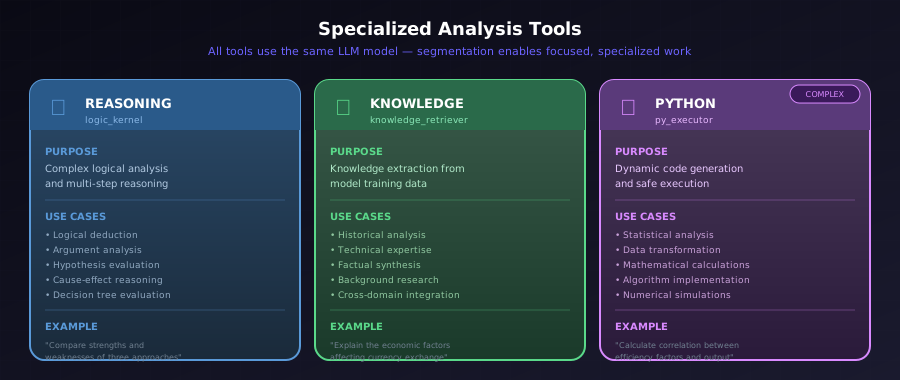
Comparison of the Three Specialized Analysis Tools
Reasoning Tool
Internal name: logic_kernel
Purpose: LLM-based chain-of-thought reasoning for complex logical analysis.
Use Cases
- Complex logical deduction
- Multi-step reasoning
- Argument analysis
- Hypothesis evaluation
- Cause-and-effect reasoning
- Decision tree evaluation
How It Works
The reasoning tool receives a query and produces structured logical analysis. It's designed for problems where you need to:
- Work through implications step by step
- Evaluate competing hypotheses
- Trace causal chains
- Analyze arguments for validity
Example Task Queries
- "Analyze the logical consistency of this business strategy"
- "Evaluate the cause-and-effect relationship between X and Y"
- "What are the implications if assumption A is true vs. false?"
- "Compare the strengths and weaknesses of these three approaches"
Configuration
The reasoning tool uses the
reasoning_temperature internal setting for its
temperature value. You can influence this globally via
temperature_offset.
Knowledge Tool
Internal name: knowledge_retriever
Purpose: LLM-based knowledge extraction and retrieval, tapping into the model's training data.
Use Cases
- Historical analysis and context
- Technical domain expertise
- Factual information synthesis
- Background research
- Definitional and conceptual queries
- Cross-domain knowledge integration
How It Works
The knowledge tool queries the LLM's training data to extract relevant information. The quality and depth of knowledge depends on the model you select—GPT-OSS 120B has broader and deeper knowledge coverage than GPT-OSS 20B.
Example Task Queries
- "What are the key principles of photovoltaic cell design?"
- "Describe the history and evolution of machine learning algorithms"
- "What regulatory frameworks govern data privacy in the EU?"
- "Explain the economic factors that affect currency exchange rates"
Important Limitation
Note
This tool retrieves information from the model's training data, not from the live internet. For current events or recent developments, you'll need the live research capability (when enabled in your environment).
Configuration
The knowledge tool uses the
deep_knowledge_temperature internal setting. You can
influence this globally via temperature_offset.
Python Execution Tool
Internal name: py_executor
Purpose: Execute dynamically generated Python code for computational tasks.
The Python tool is the most sophisticated of the three, featuring a multi-stage process for safe, effective code generation and execution.
Use Cases
- Statistical analysis
- Data transformation
- Mathematical calculations
- Algorithm implementation
- Numerical simulations
- Data visualization logic
Architecture
%%{init: {'theme': 'base', 'themeVariables': { 'primaryColor': '#1a1a2e', 'primaryTextColor': '#fff', 'primaryBorderColor': '#4a4a6a', 'lineColor': '#6c63ff', 'fontFamily': 'JetBrains Mono, monospace'}}}%%
flowchart TD
    subgraph INPUT["📥 Input"]
        A[/"Task Query"/]
    end

    subgraph PREP["🔧 Preparation"]
        B["Methodology
Suggestion"]
        C[("Function Repository
139 functions")]
        D["Data
Extraction"]
        E["Tool Query
Generation"]
    end

    subgraph EXEC["⚡ Execution"]
        F["Code
Generation"]
        G{"Safety
Check"}
        H{"Syntax
Validation"}
        I["Code Execution
subprocess"]
    end

    subgraph RECOVERY["🔄 Error Handling"]
        J["Error Analysis
& Fix Attempts"]
    end

    subgraph OUTPUT["📤 Output"]
        K[/"Result"/]
    end

    A --> B
    C -.->|"informs"| B
    B --> D
    B -.->|"guides"| D
    D --> E
    E --> F
    F --> G
    G -->|"✓ Safe"| H
    G -->|"✗ Unsafe"| J
    H -->|"✓ Valid"| I
    H -->|"✗ Invalid"| J
    I -->|"Success"| K
    I -->|"Error"| J
    J -->|"Retry"| F
    J -->|"Give up"| K

    style A fill:#4a4a6a,stroke:#6c63ff,stroke-width:2px,color:#fff
    style K fill:#4a4a6a,stroke:#6c63ff,stroke-width:2px,color:#fff
    style C fill:#0f3460,stroke:#6c63ff,stroke-dasharray: 5 5,color:#fff
    style G fill:#0f3460,stroke:#e94560,stroke-width:2px,color:#fff
    style H fill:#0f3460,stroke:#e94560,stroke-width:2px,color:#fff
    style J fill:#6b2737,stroke:#e94560,color:#fff
Python Tool Architecture
Methodology Suggestion System
Before writing code, the system determines the computational approach. This produces:
| Output | Description |
|---|---|
primary_approach |
Main computational strategy |
methods |
Specific methods to use |
formulas |
Mathematical formulas needed |
step_by_step_process |
Detailed procedure |
required_libraries |
Python packages needed |
data_transformation |
How to prepare data |
recommended_function_paths |
Specific functions to use |
Function Repository
The system has a two-phase function lookup:
- Pre-extracted Repository: 139 documented functions with signatures, parameters, return types, and examples
- Dynamic Introspection: Falls back to Python installation for additional functions
This gives the LLM detailed information about available functions before writing code.
Data Extraction
The system extracts relevant data from your context, informed by the methodology. This ensures the code receives properly structured inputs.
# Output structure
ExtractedData:
    - extracted_values: Dict of values
    - data_format: How data is structured
    - transformations_applied: What was done
Code Generation & Execution
The generated code is:
- Validated for syntax using Python's AST parser
- Checked against safety rules (see Safety section below)
- Executed in an isolated subprocess
- Subject to configurable timeout
Safety System
The Python tool includes comprehensive safety checks to prevent harmful operations.
Blocked Modules
dangerous_modules = {
    # File I/O
    "os", "io", "pathlib", "glob", "shutil", "tempfile",

    # Network
    "socket", "http", "urllib", "ftplib", "email", "smtplib",

    # System access
    "subprocess", "sys", "signal", "ctypes", "multiprocessing",

    # Code execution
    "code", "codeop", "imp",

    # Database
    "sqlite3", "dbm",
    # ... and more
}
Blocked Built-ins
dangerous_builtins = {
    "open", "exec", "eval", "compile",
    "__import__", "input", "breakpoint",
    "getattr", "setattr", "delattr",
    "globals", "locals", "vars", "dir",
}
Blocked Operations
dangerous_attrs = {
    # System/process
    "system", "popen", "spawn", "exec", "kill",

    # File operations
    "remove", "unlink", "rmdir", "mkdir",
    "chmod", "chown", "read", "write",

    # Directory traversal
    "listdir", "scandir", "walk", "glob",

    # Pandas file I/O
    "to_csv", "read_excel", "to_excel",
    # ... and more
}
Allowed Patterns (In-Memory Only)
# These patterns ARE allowed for in-memory data parsing:
pd.read_csv(io.StringIO(...))    # CSV from string
pd.read_json(io.StringIO(...))   # JSON from string
pd.read_table(io.StringIO(...))  # Table from string
String Literal Detection
The safety checker blocks:
-
Filesystem paths:
/path/to/file,C:\path,./relative -
File extensions:
.csv,.xlsx,.json,.pdf, etc. - Home directory references:
~
Error Recovery
The Python tool has a multi-level retry system:
| Level | Type | Description | Configurable Via |
|---|---|---|---|
| 1 | Syntax | AST validation failures | python_max_ast_retries |
| 2 | Safety | Security violations | python_max_safety_retries |
| 3 | Runtime | Execution errors | python_max_runtime_retries |
| 4 | Full Restart | Complete regeneration | python_max_tool_query_retries |
%%{init: {'theme': 'base', 'themeVariables': { 'primaryColor': '#1a1a2e', 'primaryTextColor': '#fff', 'primaryBorderColor': '#4a4a6a', 'lineColor': '#6c63ff', 'fontFamily': 'JetBrains Mono, monospace'}}}%%
flowchart LR
    subgraph L1["Level 1"]
        A["Syntax
Errors"]
        A1["AST Retry"]
    end

    subgraph L2["Level 2"]
        B["Safety
Violations"]
        B1["Safety Retry"]
    end

    subgraph L3["Level 3"]
        C["Runtime
Errors"]
        C1["Runtime Retry"]
    end

    subgraph L4["Level 4"]
        D["All Failed"]
        D1["Full Restart"]
    end

    A --> A1
    A1 -->|"Still failing"| B
    B --> B1
    B1 -->|"Still failing"| C
    C --> C1
    C1 -->|"Still failing"| D
    D --> D1
    D1 -->|"Regenerate
from scratch"| A

    style A fill:#16213e,stroke:#4a4a6a,color:#fff
    style B fill:#16213e,stroke:#4a4a6a,color:#fff
    style C fill:#16213e,stroke:#4a4a6a,color:#fff
    style D fill:#6b2737,stroke:#e94560,color:#fff
    style A1 fill:#0f3460,stroke:#6c63ff,color:#fff
    style B1 fill:#0f3460,stroke:#6c63ff,color:#fff
    style C1 fill:#0f3460,stroke:#6c63ff,color:#fff
    style D1 fill:#0d7377,stroke:#14ffec,color:#fff
Error Recovery Levels Flow
Temperature Escalation
Each retry increases temperature to explore different solutions:
temperature_increase = attempt * retry_temperature_increaseIndentation Fix System
The tool can automatically detect and repair Python indentation issues:
# Three strategies tried in order:
strategies = [
    _fix_strategy_round_down,       # Round to nearest lower multiple
    _fix_strategy_split_difference, # Round to nearest multiple
    _fix_strategy_round_up,         # Round to nearest higher multiple
]
Error Context Extraction
When errors occur, the system extracts detailed context:
ErrorContext:
    - error_type: Type of error (NameError, TypeError, etc.)
    - error_message: Full error message
    - problematic_line: Line number
    - problematic_code: Actual code at that line
    - variable_name: For undefined variable errors
    - suggested_fixes: Automated suggestions
Tool Selection by Task Type
The planning system automatically selects appropriate tools, but here's how tasks typically map:
| Task Type | Best Tool | Why |
|---|---|---|
| Factual research | Knowledge | Taps into training data |
| Historical context | Knowledge | Broad background information |
| Logical analysis | Reasoning | Step-by-step deduction |
| Comparing options | Reasoning | Evaluating trade-offs |
| Statistical calculations | Python | Precise computation |
| Data analysis | Python | Can process structured data |
| Mathematical modeling | Python | Implements algorithms |
| Argument evaluation | Reasoning | Logical structure analysis |
Tool Execution Details
Timeout Handling
Each tool has configurable timeouts:
| Setting | Description |
|---|---|
tool_timeout |
Default timeout for all tools |
python_tool_timeout |
Python-specific timeout (often longer) |
Timeouts increase slightly on retries for robustness:
attempt_timeout = (base_timeout * (5 + attempt)) // 5Retry Behavior
From the tool executor:
# Python tool handles its own internal restarts, so minimal retries at executor level
max_retries = 1 if tool_type == "py_executor" else settings.tool_retries
The Python tool manages its own complex retry logic internally, while other tools use the executor's retry system.
Accessing Tool Results
After analysis, you can examine what each tool produced:
result = await run_analysis(query, api_key=key)

for entry in result.output_entries:
    if entry.stage_type == "task_execution":
        task_data = entry.data
        print(f"Tool: {task_data.tool}")
        print(f"Query: {task_data.task_query}")
        print(f"Result: {task_data.result}")

        # For Python tool, you also get the code
        if task_data.code:
            print(f"Generated Code:\n{task_data.code}")

        # And methodology information
        if task_data.methodology_data:
            print(f"Approach: {task_data.methodology_data.primary_approach}")
This transparency lets you:
- Verify calculations independently
- Reuse generated code for similar problems
- Understand the reasoning behind answers
- Audit methodology for correctness