

The MainAnalysisOutput Object
Every analysis returns a MainAnalysisOutput object.
Here's what it contains:
Top-Level Fields
| Field | Type | Description |
|---|---|---|
success |
bool | Whether analysis completed successfully |
agent_id |
str | Unique identifier for this analysis run |
timestamp |
str | ISO format completion timestamp |
title |
str | Generated title for the analysis |
headline |
str | Summary headline |
query_original |
str | Your original query |
context_original |
str | Your provided context |
execution_time |
float | Total seconds elapsed |
task_count |
int | Number of tasks executed |
total_iterations |
int | Number of iteration cycles |
total_api_calls |
int | All API calls made (including retries) |
successful_task_calls |
int | API calls that produced useful results |
Answer Layers
The system provides answers at multiple levels of detail, from comprehensive to constrained.
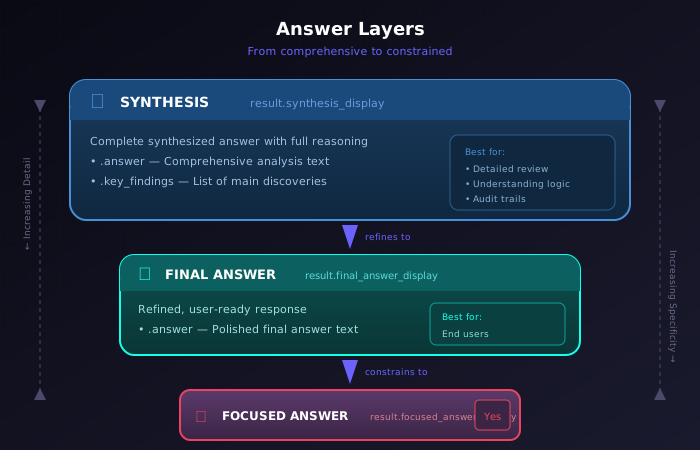
Answer Layers: Synthesis → Final Answer → Focused Answer
Synthesis
The comprehensive analysis with full reasoning.
result.synthesis_display.answer        # Complete synthesized answer
result.synthesis_display.key_findings  # List of main discoveries
Use this when you want to understand the complete reasoning and all findings.
Final Answer
A refined, user-ready response.
result.final_answer_display.answer # Polished final answer textThis is more concise than the synthesis—designed for end users rather than detailed review.
Focused Answer
When you request a specific answer type, you also get:
result.focused_answer_display.answer_type       # The type selected (e.g., "yes/no")
result.focused_answer_display.answer_value      # The specific answer ("Yes" or "No")
result.focused_answer_display.formatted_answer  # Display-ready format
The Real Value: Intermediate Outputs
Often the most valuable information is not the final answer, but the
intermediate work. The output_entries field contains
detailed records of every stage.
Iteration History
for entry in result.output_entries:
    print(f"Stage: {entry.stage_type}")
    print(f"Data: {entry.data}")
Each entry type provides different insights:
| Entry Type | What It Contains | Why It's Valuable |
|---|---|---|
| Complexity Analysis | Problem dimensions, challenges, strategy | Understand how the system approached your query |
| Plan Generation | Candidate plans considered | See alternative approaches that were evaluated |
| Task Execution | Individual task results | Examine specific reasoning or calculations |
| Task Evaluation | Why tasks were accepted/rejected | Quality control transparency |
| Iteration Decision | Continue/stop rationale | Understand when the system felt confident |
Python Code & Methodology
For computational tasks, you receive:
for entry in result.output_entries:
    if entry.stage_type == "task_execution":
        task_data = entry.data

        # The generated Python code
        if task_data.code:
            print(f"Code:\n{task_data.code}")

        # The computational approach
        if task_data.methodology_data:
            print(f"Approach: {task_data.methodology_data.primary_approach}")
            print(f"Formulas: {task_data.methodology_data.formulas}")
            print(f"Process: {task_data.methodology_data.step_by_step_process}")
Why this matters:
- Verify calculations independently
- Reuse code for similar problems
- Understand the reasoning behind numeric answers
- Audit the methodology for correctness
Knowledge & Reasoning Traces
For non-computational tasks:
for entry in result.output_entries:
    if entry.stage_type == "task_execution":
        task_data = entry.data
        print(f"Task Query: {task_data.task_query}")
        print(f"Tool Query: {task_data.tool_query}")
        print(f"Result: {task_data.result}")
        print(f"Status: {task_data.status}")  # "success" or "error"
Saving and Accessing Outputs
Save Modes
| Mode | Description | Output Location |
|---|---|---|
none |
No files saved | Data returned in memory only |
local |
Save to disk | Local output directory |
cloud |
Save to hosted storage | Hosted report folder |
Files Generated
When save_mode is local or
cloud:
| File | Contents |
|---|---|
analysis_output.json |
Complete MainAnalysisOutput as JSON |
index.html |
Interactive HTML report with full history |
logs.txt |
Execution logs for debugging |
estimated_costs.txt |
Token usage and cost breakdown |
image.jpg |
AI-generated image (if image generation is enabled) |
The HTML Report
The generated index.html is a comprehensive,
human-readable report featuring:
- Visual presentation of all analysis stages
- Expandable/collapsible sections for each iteration
- Color-coded task acceptance/rejection
- Code blocks with syntax highlighting (for Python tasks)
- Cost and timing metrics
- The generated image (if enabled)
Cost Information
Every analysis includes detailed cost tracking:
cost_snapshot = result.cost_snapshot

# Token counts
tokens = cost_snapshot['tokens']
print(f"Total tokens: {tokens['total']}")
print(f"Input tokens: {tokens['input']}")
print(f"Cached tokens: {tokens['cached']}")
print(f"Output tokens: {tokens['output']}")

# Costs
costs = cost_snapshot['costs']
print(f"Input cost: ${costs['input_cost']:.4f}")
print(f"Cached cost: ${costs['cached_cost']:.4f}")
print(f"Output cost: ${costs['output_cost']:.4f}")
print(f"Total cost: ${costs['total_cost']:.4f}")
print(f"Cache savings: ${costs['total_cache_savings']:.4f}")

# API calls
print(f"API calls made: {cost_snapshot['api_call_count']}")
Why Cost Tracking Matters
- Budget management for automated systems
- Optimization insights (higher cache hit rates = lower costs)
- Comparison between different parameter settings
- Understanding which stages are most expensive
Using Outputs Programmatically
Basic Access Pattern
result = await run_analysis(
    query="What factors affect solar panel efficiency?",
        api_key=key,
    params={"focused_answer_type": "number"}
)

# Check success
if not result.success:
    print("Analysis failed")
    return

# Access different answer layers
full_synthesis = result.synthesis_display.answer
final_answer = result.final_answer_display.answer
focused_value = result.focused_answer_display.answer_value

print(f"Synthesis: {full_synthesis[:200]}...")
print(f"Final Answer: {final_answer[:200]}...")
print(f"Focused Value: {focused_value}")
Examining All Tasks
for entry in result.output_entries:
    if entry.stage_type == "task_execution":
        task_data = entry.data

        print(f"\n--- Task: {task_data.task_label} ---")
        print(f"Tool: {task_data.tool}")
        print(f"Query: {task_data.task_query}")
        print(f"Status: {task_data.status}")
        print(f"Execution time: {task_data.execution_time:.2f}s")

        if task_data.status == "success":
            print(f"Result preview: {task_data.result[:300]}...")
        else:
            print(f"Error: {task_data.error_details}")

        if task_data.code:
            print(f"Generated code:\n{task_data.code}")
Extracting Key Findings
findings = result.synthesis_display.key_findings

print("Key Findings:")
for i, finding in enumerate(findings, 1):
    print(f"  {i}. {finding}")
Cost Analysis
costs = result.cost_snapshot['costs']

print(f"Analysis cost breakdown:")
print(f"  Input tokens:  ${costs['input_cost']:.4f}")
print(f"  Cached tokens: ${costs['cached_cost']:.4f} (saved ${costs['total_cache_savings']:.4f})")
print(f"  Output tokens: ${costs['output_cost']:.4f}")
print(f"  ─────────────────────")
print(f"  Total:         ${costs['total_cost']:.4f}")

cache_rate = result.cost_snapshot['tokens']['cached'] / result.cost_snapshot['tokens']['input']
print(f"\nCache hit rate: {cache_rate:.1%}")
Response Model Reference
ToolResult
Returned by individual tool executions:
ToolResult:
    content: str           # Main result content
    execution_time: float  # Time taken
    success: bool          # Success flag
    tool_query: str        # Query that was executed
    code: str | None       # Generated code (Python tool only)
    methodology_data       # Methodology information
    raw_data               # Structured tool data
TaskExecutionResult
Detailed task execution record:
TaskExecutionResult:
    task_label: TaskLabel
    tool: str
    task_query: str
    tool_query: str
    result: str
    status: "success" | "error"
    execution_time: float
    error_details: str | None
    code: str | None
    methodology_data: MethodologyData | None
    raw_data: StructuredToolData | None
PipelineExecutionResult
Overall pipeline result:
PipelineExecutionResult:
    success: bool
    error: Exception | None
    execution_time: float
    stage_results: list[PipelineResult]
    metadata: dict
Tips for Working with Outputs
-
For debugging: In the Python API, enable
save_mode="local"and examine the HTML report and logs.txt. In the hosted web experience, inspect the returned report link and live execution log. - For automation: Use focused answer types for predictable, parseable outputs.
-
For auditing: Iterate through
output_entriesto trace exactly how conclusions were reached. -
For cost optimization: Compare
total_costacross different parameter configurations to find the best balance. - For verification: Extract and re-run Python code independently to verify calculations.