

Entry Points
The system provides two ways to run analyses:
| Method | Use Case |
|---|---|
run_analysis() |
Simple one-shot analyses |
create_agent() + analyze() |
When you need more control over the agent lifecycle |
Method 1: run_analysis()
The simplest way to run an analysis. Creates an agent, runs the analysis, and cleans up automatically.
import asyncio
from agent import run_analysis

async def main():
    result = await run_analysis(
        query="What are the key factors affecting renewable energy adoption?",
        context="Focus on economic and policy factors in the United States.",
    api_key="your-access-key",
        params={
            "mode": "balanced",
            "max_iterations": 3,
        }
    )

    print(f"Final Answer: {result.final_answer}")
    print(f"Execution Time: {result.execution_time:.2f}s")
    print(f"Success: {result.success}")

asyncio.run(main())
Parameters
| Parameter | Required | Description |
|---|---|---|
query |
Yes | The question or task (max 1,200 characters) |
context |
No | Background information (max 36,000 characters) |
api_key |
Yes | Your primary access credential |
research_key |
No | Enables live research features |
image_key |
No | Enables image generation |
params |
No | Dictionary of settings (see Settings) |
Method 2: create_agent() + analyze()
For more control over the agent lifecycle:
import asyncio
from agent import create_agent

async def main():
    # Create and initialize the agent
    agent = await create_agent(
        agent_id="myagnt",  # Optional: 6 lowercase letters (auto-generated if not provided)
      api_key="your-access-key",
        params={
            "model": "openai/gpt-oss-120b",
            "mode": "thorough",
            "cost_limit": 0.50,
        }
    )

    try:
        # Run the analysis
        result = await agent.analyze(
            query="Analyze the potential impact of quantum computing on cryptography.",
            context="Consider both near-term and long-term implications."
        )

        print(f"Success: {result.success}")
        print(f"Final Answer: {result.final_answer}")

    finally:
        # Cleanup is automatic, but explicitly shown here
        await agent.cleanup()

asyncio.run(main())
Critical Rule: Single-Use Agents
# WRONG - This will fail!
agent = await create_agent(api_key=key)
result1 = await agent.analyze("Query 1")  # OK
result2 = await agent.analyze("Query 2") # ERROR!# CORRECT - Create new agent for each analysis
result1 = await run_analysis("Query 1", api_key=key)
result2 = await run_analysis("Query 2", api_key=key)For running multiple concurrent analyses, see Concurrent.
Your First Analysis
Step 1: Prepare an Access Credential
- Create an account with your chosen hosted inference service
- Generate an access credential
- Keep it secure
Step 2: Install Dependencies
pip install openai asyncioStep 3: Run a Simple Analysis
import asyncio
from agent import run_analysis

async def main():
    result = await run_analysis(
        query="What are the three most important factors when choosing a programming language for a new project?",
    api_key="your_access_key_here",
    )

    if result.success:
        print("=== Analysis Complete ===")
        print(f"Title: {result.title}")
        print(f"Time: {result.execution_time:.1f}s")
        print(f"Tasks: {result.task_count}")
        print()
        print("=== Answer ===")
        print(result.final_answer)
    else:
        print("Analysis failed")

asyncio.run(main())
Step 4: Examine the Output
The result object contains multiple layers of information:
# The refined, user-ready answer
print(result.final_answer)

# The comprehensive synthesis with reasoning
print(result.synthesis_display.answer)

# Key findings extracted during analysis
for finding in result.synthesis_display.key_findings:
    print(f"• {finding}")

# Cost information
costs = result.cost_snapshot['costs']
print(f"Total cost: ${costs['total_cost']:.4f}")
print(f"Cache savings: ${costs['total_cache_savings']:.4f}")
Choosing the Right Mode
Start with these recommendations:
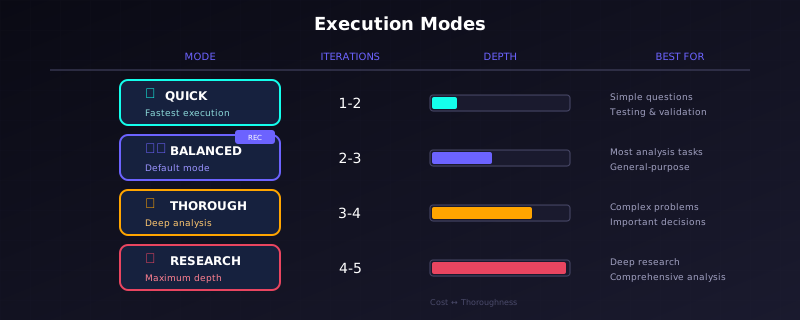
Visual Comparison of Quick, Balanced, Thorough, and Research Modes
| Your Situation | Recommended Settings |
|---|---|
| Quick question, testing | mode="quick" |
| General analysis | mode="balanced" (default works well) |
| Important decision |
mode="thorough",
model="openai/gpt-oss-120b"
|
| Deep research |
mode="research",
model="openai/gpt-oss-120b"
|
| Budget-conscious |
mode="quick",
model="openai/gpt-oss-20b",
candidate_plans=1
|
Adding Context
Context helps the system understand your specific situation:
result = await run_analysis(
    query="Should we expand into the European market?",
    context="""
    Company: Mid-size B2B SaaS provider
    Current markets: US, Canada
    Annual revenue: $15M
    Product: Project management software
    Team size: 50 employees
    Key concern: GDPR compliance costs
    """,
    api_key=key,
    params={"mode": "thorough"}
)Getting Specific Answers
Use focused_answer_type when you need a constrained
response:
# Yes/No decision
result = await run_analysis(
    query="Based on current market conditions, should we launch the product this quarter?",
    context="[market data here]",
  api_key=key,
    params={"focused_answer_type": "yes/no"}
)
print(f"Decision: {result.focused_answer_display.answer_value}")  # "Yes" or "No"

# Numeric answer
result = await run_analysis(
    query="What is the estimated ROI percentage for this investment?",
    context="[financial data here]",
  api_key=key,
    params={"focused_answer_type": "number"}
)
print(f"ROI: {result.focused_answer_display.answer_value}")  # A number

# Risk level
result = await run_analysis(
    query="What is the risk level of this strategy?",
    context="[strategy details here]",
  api_key=key,
    params={"focused_answer_type": "high/medium/low"}
)
print(f"Risk: {result.focused_answer_display.answer_value}")  # "High", "Medium", or "Low"
Saving Outputs
In the core Python API, results are returned in memory by default. To save files explicitly:
result = await run_analysis(
    query="Analyze market trends for electric vehicles",
    api_key=key,
    params={
        "save_mode": "local",  # Python API only; saves to outputs/{agent_id}/
    }
)
In the hosted web experience, output saving is handled automatically and you receive a report link when the run completes.
This generates:
| File | Contents |
|---|---|
analysis_output.json |
Complete results as JSON |
index.html |
Interactive HTML report |
logs.txt |
Execution logs |
estimated_costs.txt |
Token usage and costs |
Next Steps
- Settings — Learn about the shared settings, hosted web controls, and advanced integration options
- Pipeline — Understand how the analysis stages work
- Outputs — Deep dive into what you receive
- Concurrent — Run multiple analyses for ensemble voting