

Why Run Multiple Analyses?
When using smaller models, no single run should be relied upon for critical decisions. Running multiple analyses lets you:
- Find consensus: If most analyses agree, confidence is high
- Identify edge cases: Divergent results reveal difficult aspects
- Explore variations: Different temperatures produce different perspectives
- Validate important decisions: Multiple confirmations reduce error risk
Single Analysis (Baseline)
For reference, here's a simple single analysis:
import asyncio
from agent import run_analysis

async def main():
    result = await run_analysis(
        query="What are the key factors affecting renewable energy adoption?",
    api_key="your-access-key",
    )
    print(f"Answer: {result.final_answer}")

asyncio.run(main())
Running Multiple Concurrent Analyses
For concurrent analyses, create shared resources to coordinate API access:
- ONE shared API client (connection pooling)
- ONE shared state manager (rate limit coordination)
import asyncio
from some_client import AsyncInferenceClient
from agent import create_agent
from coordination import SharedAccessManager

async def run_ensemble_analysis(query: str, num_runs: int = 5):
    """Run multiple analyses and collect results for ensemble voting."""

    # Step 1: Create ONE shared client (connection pooling)
    shared_client = AsyncInferenceClient(
      api_key="your-access-key",
      timeout=120,
    )

    # Step 2: Create ONE shared state manager (rate limit coordination)
    shared_state = SharedAccessManager()

    async def single_analysis(run_id: int):
        """Execute a single analysis run."""
        agent = await create_agent(
            agent_id=f"run{run_id:02d}",
            api_client=shared_client,
            shared_api_state=shared_state,
            params={
                "mode": "balanced",
                "temperature_offset": 0.1 * run_id,  # Vary creativity
            }
        )
        try:
            return await agent.analyze(query)
        finally:
            await agent.cleanup()

    # Step 3: Run all analyses concurrently
    tasks = [single_analysis(i) for i in range(num_runs)]
    results = await asyncio.gather(*tasks, return_exceptions=True)

    # Step 4: Collect successful results
    successful = [r for r in results if not isinstance(r, Exception)]
    print(f"Completed {len(successful)}/{num_runs} analyses")

    return successful

# Example: Run 5 analyses and find consensus
asyncio.run(run_ensemble_analysis("Is quantum computing a threat to current encryption?", 5))
The Shared State Manager
A shared access manager provides critical coordination for concurrent service access.
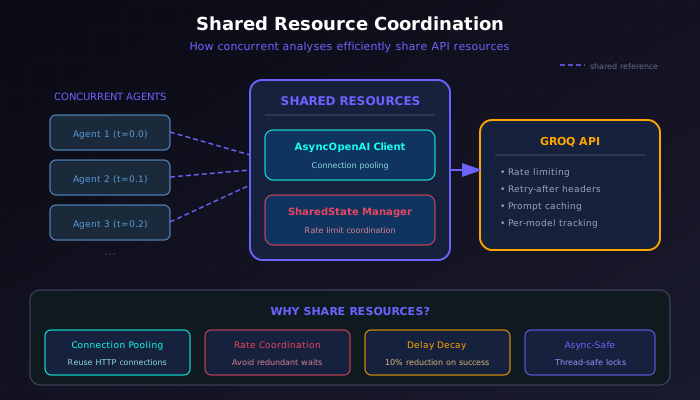
How Concurrent Analyses Share Resources
Features
| Feature | Benefit |
|---|---|
| Rate Limit Tracking | Parses retry-after delays from API errors |
| Delay Accumulation | Adds delays when multiple rate limits hit |
| Success Decay | Reduces delays by 10% on successful calls |
| Per-Model Tracking | Separate delay tracking for each model |
| Async-Safe | Uses asyncio.Lock for thread-safe access |
When to Use
| Scenario | Recommendation |
|---|---|
| Single analysis | Not needed (created automatically) |
| Multiple sequential analyses | Optional (helps with rate limits) |
| Multiple concurrent analyses | Required for coordination |
| Multi-agent systems | Required for efficiency |
Ensemble Voting Pattern
The most common use case for concurrent analysis is finding consensus:
%%{init: {'theme': 'base', 'themeVariables': { 'primaryColor': '#1a1a2e', 'primaryTextColor': '#fff', 'primaryBorderColor': '#4a4a6a', 'lineColor': '#6c63ff', 'fontFamily': 'JetBrains Mono, monospace'}}}%%
flowchart TD
    subgraph INPUT["Input"]
        Q[/"Query"/]
        SC["Shared Client"]
        SS["Shared State"]
    end

    subgraph PARALLEL["Parallel Analyses"]
        A1["Analysis 1
temp: 0.0"]
        A2["Analysis 2
temp: 0.1"]
        A3["Analysis 3
temp: 0.2"]
        A4["Analysis 4
temp: 0.3"]
        A5["Analysis 5
temp: 0.4"]
    end

    subgraph AGGREGATE["Aggregation"]
        V["Vote Counter"]
        C{"Consensus
Check"}
    end

    subgraph OUTPUT["Output"]
        R1["High Confidence
4-5 agree"]
        R2["Medium Confidence
3 agree"]
        R3["Low Confidence
split vote"]
    end

    Q --> A1 & A2 & A3 & A4 & A5
    SC -.-> A1 & A2 & A3 & A4 & A5
    SS -.-> A1 & A2 & A3 & A4 & A5
    A1 & A2 & A3 & A4 & A5 --> V
    V --> C
    C -->|"Strong agreement"| R1
    C -->|"Majority"| R2
    C -->|"Divergent"| R3

    style Q fill:#4a4a6a,stroke:#6c63ff,stroke-width:2px,color:#fff
    style SC fill:#0f3460,stroke:#6c63ff,stroke-dasharray: 5 5,color:#fff
    style SS fill:#0f3460,stroke:#6c63ff,stroke-dasharray: 5 5,color:#fff
    style C fill:#0f3460,stroke:#e94560,stroke-width:2px,color:#fff
    style R1 fill:#0d7377,stroke:#14ffec,stroke-width:2px,color:#fff
    style R2 fill:#4a4a6a,stroke:#6c63ff,color:#fff
    style R3 fill:#6b2737,stroke:#e94560,color:#fff
Ensemble Voting Pattern
async def find_consensus(query: str, runs: int = 3):
    """Run multiple analyses and find the most common answer."""
    results = await run_ensemble_analysis(query, runs)

    # For focused answers (yes/no, true/false, etc.)
    focused_answers = [r.focused_answer for r in results if r.focused_answer]

    if focused_answers:
        from collections import Counter
        answer_counts = Counter(focused_answers)
        consensus = answer_counts.most_common(1)[0]
        print(f"Consensus: {consensus[0]} ({consensus[1]}/{runs} agreement)")
        return consensus[0]

    return results[0].final_answer  # Fall back to first result
Example with Yes/No Questions
async def confident_yes_no(query: str, context: str = ""):
    """Get a high-confidence yes/no answer through ensemble voting."""

    shared_client = AsyncInferenceClient(
      api_key="your-access-key",
      timeout=120,
    )
    shared_state = SharedAccessManager()

    async def single_run(i):
        agent = await create_agent(
            agent_id=f"vote{i:02d}",
            api_client=shared_client,
            shared_api_state=shared_state,
            params={
                "mode": "balanced",
                "focused_answer_type": "yes/no",
                "temperature_offset": 0.05 * i,
            }
        )
        try:
            return await agent.analyze(query, context)
        finally:
            await agent.cleanup()

    # Run 5 analyses
    tasks = [single_run(i) for i in range(5)]
    results = await asyncio.gather(*tasks, return_exceptions=True)

    # Count votes
    votes = [r.focused_answer_display.answer_value
             for r in results
             if not isinstance(r, Exception) and r.success]

    from collections import Counter
    vote_counts = Counter(votes)

    if vote_counts:
        winner, count = vote_counts.most_common(1)[0]
        confidence = count / len(votes)
        return {
            "answer": winner,
            "confidence": confidence,
            "votes": dict(vote_counts),
            "total_runs": len(votes),
        }

    return {"answer": None, "confidence": 0, "error": "All analyses failed"}

# Usage
result = await confident_yes_no(
    "Should we proceed with the merger based on the financial analysis?",
    context="[financial data here]"
)
print(f"Answer: {result['answer']} (confidence: {result['confidence']:.0%})")
print(f"Vote breakdown: {result['votes']}")
Interpreting Convergence and Divergence
When running multiple analyses, the pattern of results tells you about confidence:
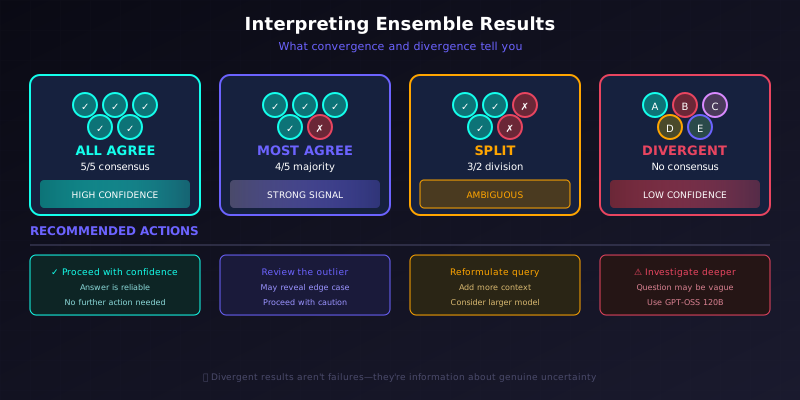
Guide for Interpreting Ensemble Analysis Results
| Result Pattern | Interpretation | Action |
|---|---|---|
| All agree | High confidence in answer | Proceed with confidence |
| Most agree (e.g., 4/5) | Strong signal, possible edge case | Review the outlier for insights |
| Split (e.g., 3/2) | Ambiguous or difficult question | Consider reformulating query |
| All different | Question may be too vague | Add context or use larger model |
What Divergence Tells You
When analyses diverge significantly:
- The question may be ambiguous — Add more context or be more specific
- The problem is genuinely difficult — Consider using GPT-OSS 120B
- There's legitimate uncertainty — The answer may depend on assumptions
- The model lacks relevant knowledge — Consider if the question is outside training data
Varying Parameters Across Runs
Different parameter variations can provide different perspectives:
Temperature Variation
# Each run uses slightly higher temperature
for i in range(5):
    params = {
        "mode": "balanced",
        "temperature_offset": 0.1 * i,  # 0.0, 0.1, 0.2, 0.3, 0.4
        "focused_answer_type": "yes/no",
    }
Lower temperatures give more consistent, focused answers. Higher temperatures explore more possibilities.
Model Variation
# Compare models
models = ["openai/gpt-oss-20b", "openai/gpt-oss-120b"]
for model in models:
    params = {"model": model, "mode": "thorough"}
If both models agree, confidence is high. If they disagree, the larger model's answer is usually more reliable.
Mode Variation
# Different analysis depths
modes = ["quick", "balanced", "thorough"]
for mode in modes:
    params = {"mode": mode}
If quick and thorough analyses agree, the answer is probably straightforward. Disagreement suggests the thorough analysis found nuances.
Batch Processing
For processing many different queries efficiently:
async def batch_analyze(queries: list[str], api_key: str):
    """Process multiple different queries concurrently."""

        shared_client = AsyncInferenceClient(
          api_key=api_key,
          timeout=120,
        )
        shared_state = SharedAccessManager()

    async def analyze_one(i, query):
        agent = await create_agent(
            agent_id=f"batch{i:03d}",
            api_client=shared_client,
            shared_api_state=shared_state,
            params={"mode": "balanced"}
        )
        try:
            result = await agent.analyze(query)
            return {"query": query, "answer": result.final_answer, "success": True}
        except Exception as e:
            return {"query": query, "error": str(e), "success": False}
        finally:
            await agent.cleanup()

    tasks = [analyze_one(i, q) for i, q in enumerate(queries)]
    return await asyncio.gather(*tasks)

# Usage
queries = [
    "What are the benefits of remote work?",
    "How does inflation affect housing prices?",
    "What factors drive employee retention?",
]
results = await batch_analyze(queries, "your-api-key")
Best Practices
Do
- Create shared client and state once at the start
- Use unique agent_ids for each concurrent analysis
-
Handle exceptions from
asyncio.gatherwithreturn_exceptions=True - Clean up agents in finally blocks
- Vary temperature slightly across ensemble runs
Don't
- Don't create new clients for each analysis — wastes connections
- Don't skip shared state for concurrent runs — causes rate limit issues
- Don't ignore failed analyses — check why they failed
- Don't use identical parameters for ensemble voting — you want variation
Rate Limit Handling
The shared state manager handles rate limits automatically, but for heavy usage:
# Add small delays between starting analyses
async def staggered_ensemble(query: str, num_runs: int = 5, delay: float = 0.5):
    tasks = []
    for i in range(num_runs):
        tasks.append(asyncio.create_task(single_analysis(i)))
        await asyncio.sleep(delay)  # Stagger start times

    return await asyncio.gather(*tasks, return_exceptions=True)
Cost Considerations
Concurrent analyses multiply costs:
| Runs | Approximate Cost Multiplier |
|---|---|
| 1 | 1x (baseline) |
| 3 | ~3x |
| 5 | ~5x |
Mitigation strategies:
-
Use
quickmode for ensemble voting on simple questions -
Use
gpt-oss-20bfor initial ensemble, upgrade to120bonly if results diverge - Start with 3 runs; add more only if results are split
-
Use
candidate_plans=1for ensemble runs to reduce per-run cost